
Epinium updates: the MCP now writes, and smart campaigns move to workflows
The Epinium MCP now creates workflows and Sponsored Products campaigns from Claude or ChatGPT. What changes, which plan you need and how to migrate your smart campaigns before 22 October.
 Carlos Martínez 6 min read
Executive summary
- What changes: the Epinium MCP no longer just reads your account — it can now create and edit workflows and Sponsored Products campaigns from Claude or ChatGPT. It requires the Business plan.
- What you need to do: smart campaigns are moving to workflows. You have until 22 October 2026 to migrate them yourself and choose how each one is run.
- What else is new: a workflow template library, led by the Smart Campaigns Optimizer, and Budget Pacing, which leaves the pilot.
Table of contents
This was one of those weeks that change how you work with the platform. Until now, the assistant you connected to Epinium could see your account, explain what was going on and recommend what to do. Now it can do it. Here are the four updates, what you can do with each one and where the limits are.
1. The Epinium MCP now writes
The Epinium MCP is the connector that links your account to Claude or ChatGPT. Until now it was read-only: 41 tools to query sales, campaigns, catalog and performance, and 100 marketing playbooks to analyze them. As of this week, it also writes.
In practice, you can ask it something like this:
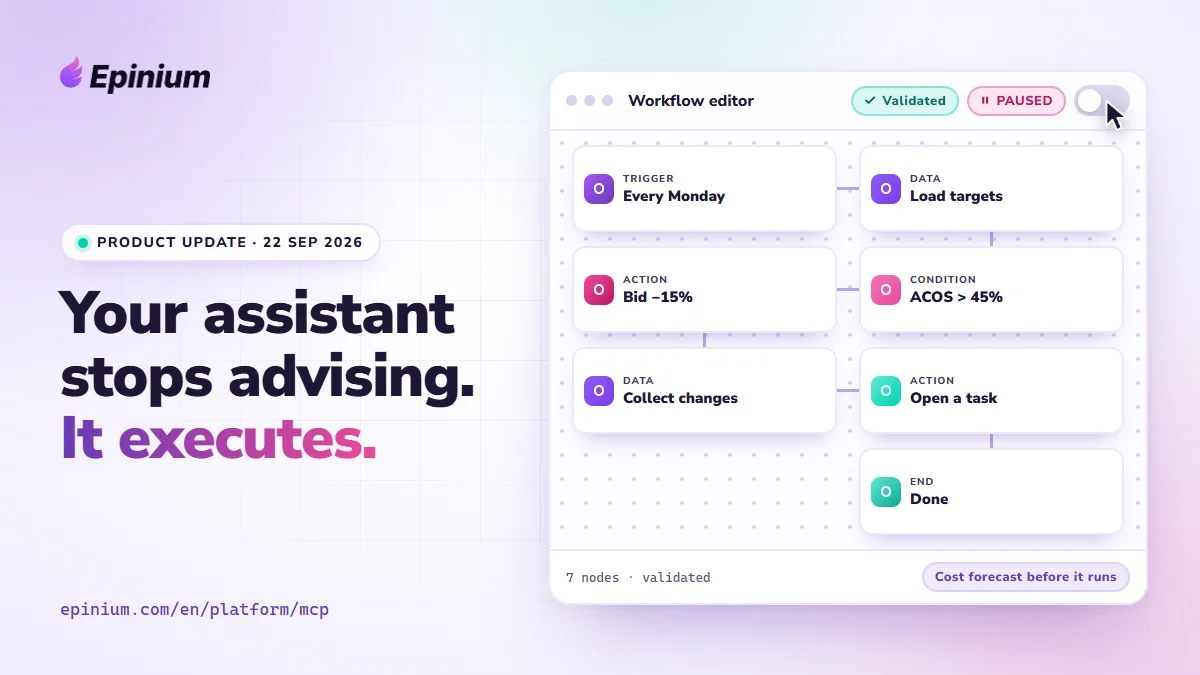
“Every Monday, lower the bid by 15% on targets with ACOS over 45% and open a task with whatever you touched.”
And the assistant hands you back the workflow built, validated and paused, ready for you to review and switch on.
What it can write today:
- Workflows: create, clone, edit, pause, delete and restore any earlier version. You can also run them on the spot, simulate them first (a simulation never reaches Amazon) and ask for a cost forecast before executing.
- Sponsored Products campaigns: campaigns, ad groups, targets and product ads. The whole structure in one go, if you want it.
- Campaign templates: clone the Smart Campaigns Optimizer with the level of autonomy you choose.
Where the boundary is (and why we put it there):
- Two permissions, ticked by you. Writing depends on two scopes,
workflows:writeandcampaigns:write, which you enable when you issue the key. Without them, those tools do not even show up for the assistant: it cannot call what it cannot see. You revoke access from Settings → MCP whenever you want. - A new campaign does not start spending. It is created PAUSED unless you explicitly ask for it enabled, and the daily budget is checked against the marketplace minimum before it reaches Amazon.
- Sponsored Products only. Sponsored Brands and Sponsored Display are not writable yet, and your catalog is never edited over MCP, on any plan.
- Everything is logged. The change log keeps everything Epinium changed on Amazon, whoever asked for it, including what Amazon rejected. It is kept for 90 days.
Which plan you need. Reading is still available on every plan. Writing is part of the Business plan; on Free and Guru the MCP stays read-only. It is all on the pricing page.
2. Smart campaigns move to workflows (by 22 October)
Under the hood, a Smart Campaign was four Amazon campaigns working together: auto, categories, validation and performance. They worked, but they were a black box that was hard to tune. From now on that logic lives in a workflow, which you can see step by step, edit and simulate.
What the migration does:
- Keeps the best-performing campaign and leaves it active.
- Pauses the other three (reversible whenever you want), moves their targets over to the one that stays and concentrates the budget there.
- Links the campaign to the workflow that will run it.
The only thing that is not reversible is conflicting negatives: they are archived so the migrated targets can serve, and Amazon does not allow reactivating an archived negative.
Four autonomy modes to choose how much the workflow decides:
| Mode | What it does |
|---|---|
| Maintenance | Only adjusts bids. |
| Growth | Also harvests the search terms that already sell. |
| Expansion (default) | Proposes new keywords, blocks wasteful terms sooner and prunes exhausted parent keywords. |
| Custom | The moment you touch a parameter by hand. |
The date that matters: 22 October 2026. Until that day you choose which workflow runs each campaign, and you can simulate the migration before applying it. After that date we migrate whatever is left: nothing for you to do, but we pick the workflow and the day for you. New Smart Campaigns can no longer be created; that screen only migrates the ones you already have.
The full details are on the AI advertising automation page.
DEADLINE: 22 OCTOBER
Migrate your smart campaigns yourself. Pick the autonomy mode for each one and simulate the result before applying it.
Free simulation · reversible except archived negatives
3. Workflow template library
You do not have to build a workflow from scratch. The new template library brings together automations ready to clone and adapt. The headline act is the Smart Campaigns Optimizer: once a day it recalculates bids, harvests winning search terms, negates the ones that only spend and manages quarantine, with the autonomy mode you choose.
Three details that matter:
- You know what it does before you add it. Each template shows its category, when it runs, whether it writes to Amazon or only creates tasks, whether it uses AI credits and how many settings it will ask you for. This is worked out from the workflow itself, not from a description.
- Clones are born paused. Nothing runs until you switch it on.
- Everyone sees the library, but the campaign templates (the Smart Campaigns Optimizer among them) require the Business plan or above.
You can clone them from the workflows editor or just ask the assistant to do it over MCP.
4. Budget Pacing, out of the pilot
Budget Pacing spreads your campaigns’ daily budget so it does not run out mid-afternoon or sit unspent at the end of the month. Until now it was in a pilot alongside the optimizer; as of this week you add it from the library like any other campaign template (Business plan or above). Because it moves real budgets, it is born paused: you review it, adjust the caps and switch it on yourself.
What we recommend you do this week
- If you use Smart Campaigns: log in, simulate the migration and choose the autonomy mode for each campaign. Better now than letting it be decided for you on 22 October.
- If you are on Business: connect the MCP to Claude or ChatGPT, tick the two write scopes and try asking it for a simple workflow. Simulate it before switching it on.
- If you are on Free or Guru: the read-only MCP and the 100 playbooks are still yours. When you want the assistant to move from advising to executing, you know which plan unlocks it.
Frequently asked questions
Can the assistant change something without me noticing?
It cannot call a tool it does not have. You tick the write permissions when you issue the key; without them, those tools do not show up. On top of that, campaigns are born paused and every change stays in the change log for 90 days.
Which plan do I need for the MCP to write?
The Business plan. On Free and Guru the MCP is read-only: the playbooks, your Amazon data and the 41 read tools all work the same.
What happens if I do not migrate my smart campaigns before 22 October?
We migrate them for you. You will not have to do anything, but we will pick the workflow and the day for you. If you migrate first, you choose, and you can simulate it.
Can the migration be undone?
Almost all of it: pausing the campaigns, the budget and the workflow link can be reverted whenever you want. The only thing that cannot be undone is the conflicting negatives that get archived, because Amazon does not allow reactivating them.
Can the MCP touch my catalog?
No. The product catalog is never edited over MCP, on any plan.
EPINIUM MCP · WRITE
Your assistant stops advising and executes. Connect Epinium to Claude or ChatGPT and create workflows and campaigns just by asking.
7 days free · no card · writing requires the Business plan